Bengala sorts your playlist into live TV, a guide, films and series, and puts it all within reach of four arrows and an OK. Anything you don’t fancy typing with the remote, you type on your phone.
Coming soon to Google Play and the LG Content Store.In the meantime, you can see what it looks like, what it costs and which TVs it works on.
Android TV and Google TVcoming soon
LG TVscoming soon
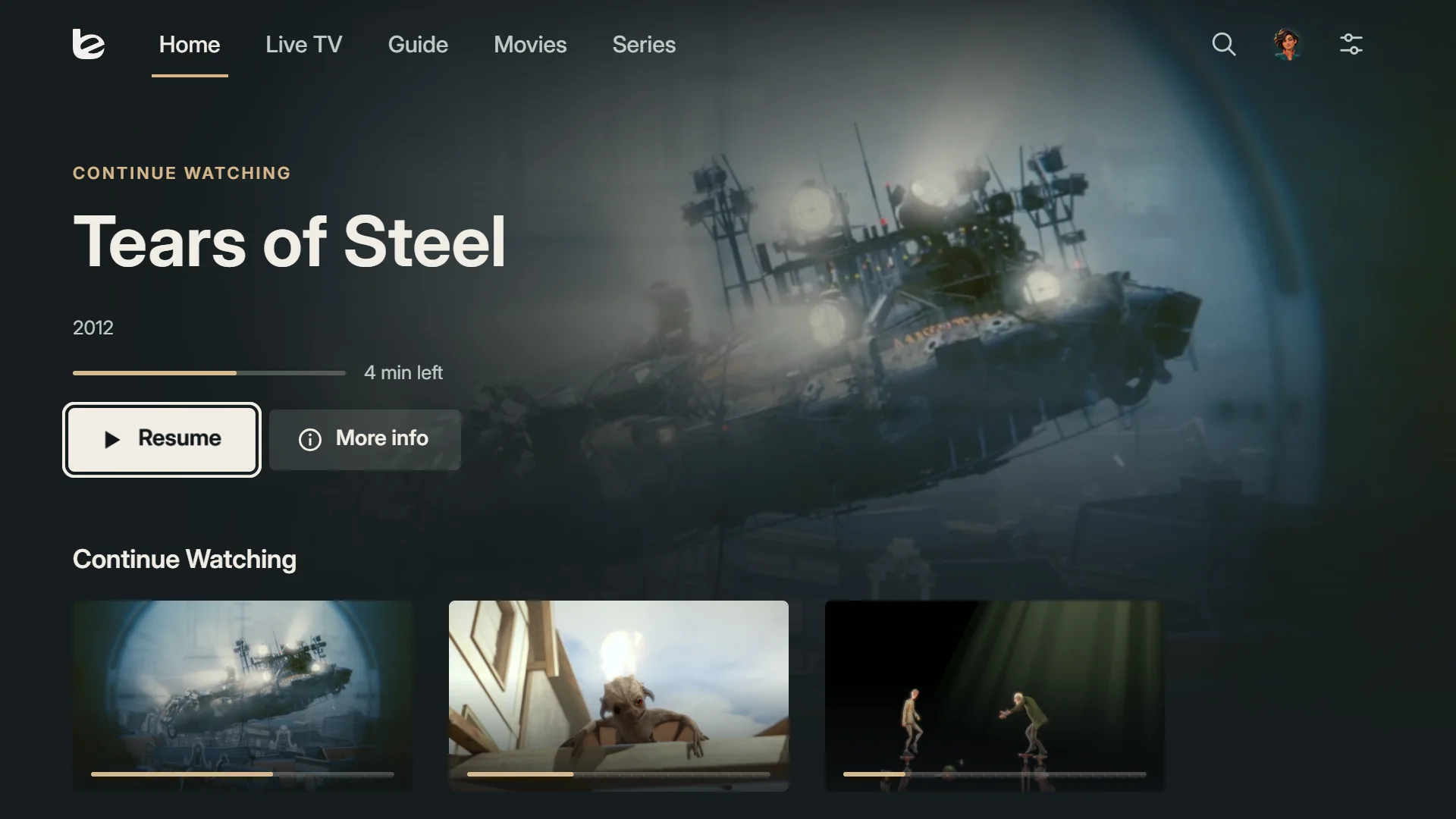
Home on an LG TV.
On your TV
Your playlist, exactly as you’ll see it
Every image on this page is a real screenshot of Bengala running our demo playlist: open films from Blender Studio and made-up channels. What you see is what you get.
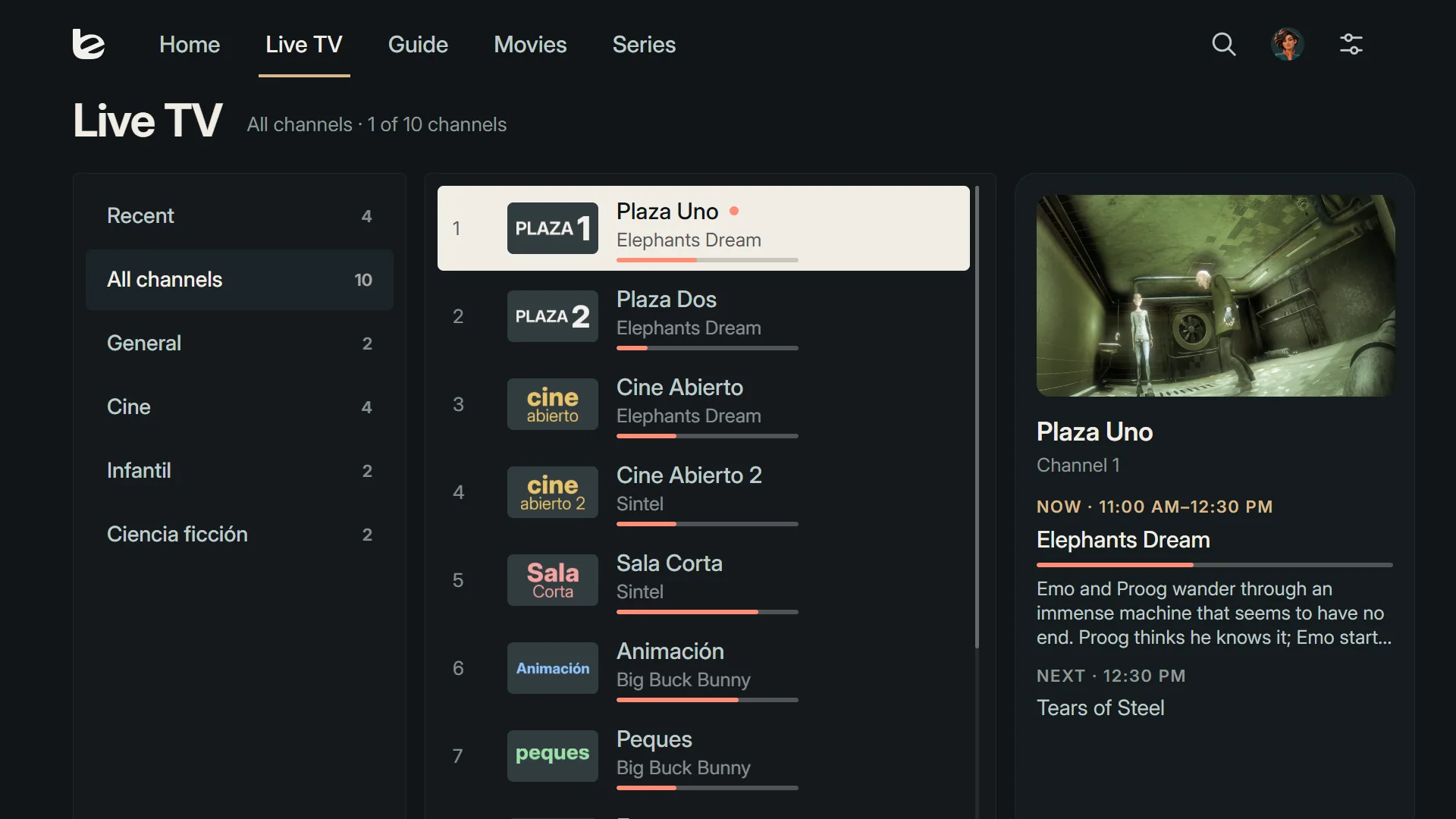
Live TV on Android TV.
1Live TV
Thousands of channels, and you never lose your place
Groups on the left, channels in the middle and, on the right, what’s on now and what’s on next. Your recent channels are always at the top.
If a channel doesn’t respond, Bengala tries another version of the same channel in your playlists before giving up.
2Guide
The whole evening at a glance
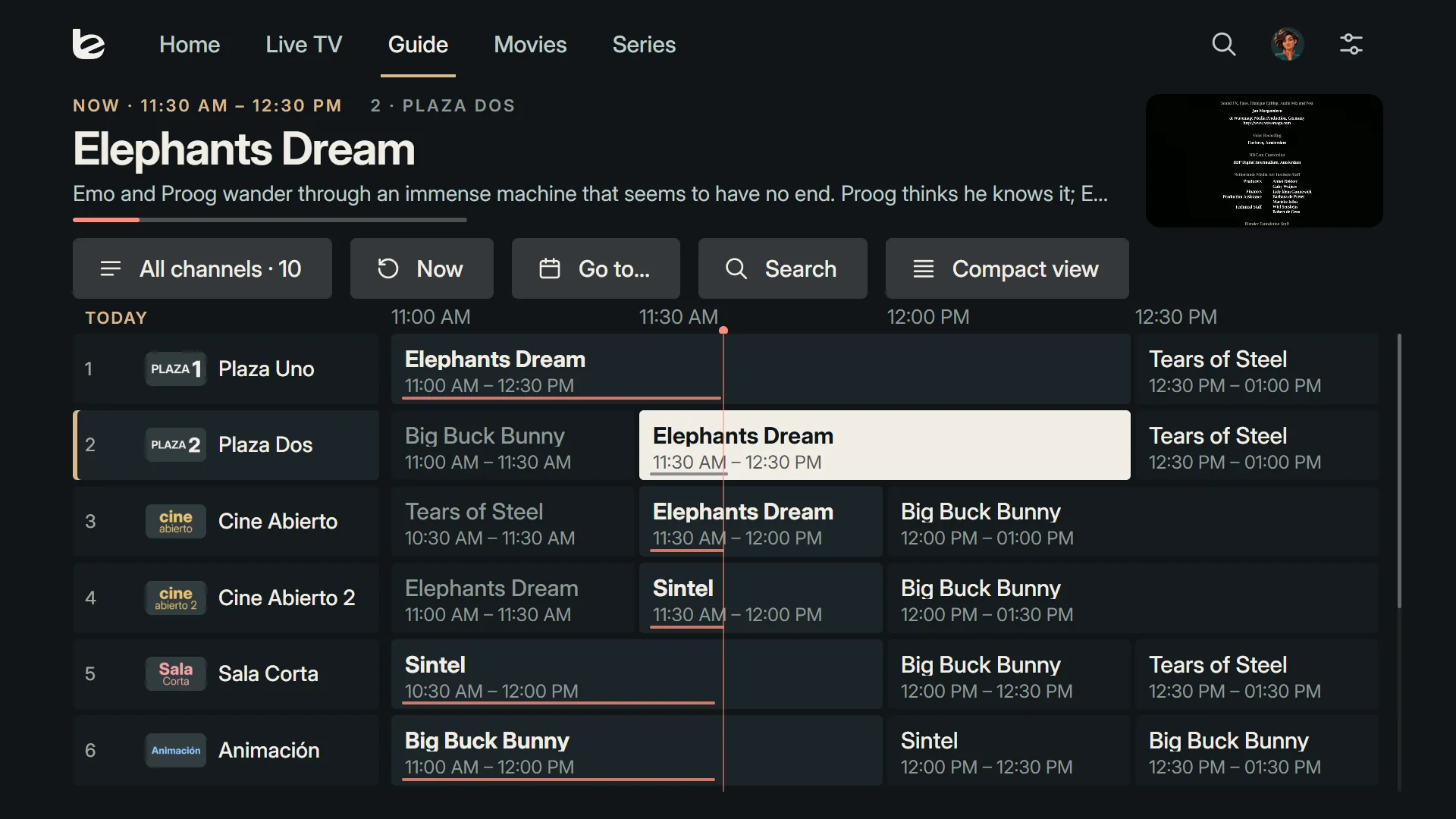
Several channels and hours of programmes on one screen. Skip ahead, open the details of a programme that hasn’t started yet and set a reminder. If your provider keeps past programmes, you can go back too.
Save a word, such as your team’s name, and Bengala lets you know when it turns up in the guide.
Guide on LG webOS.
3Films and series
The next episode is already lined up
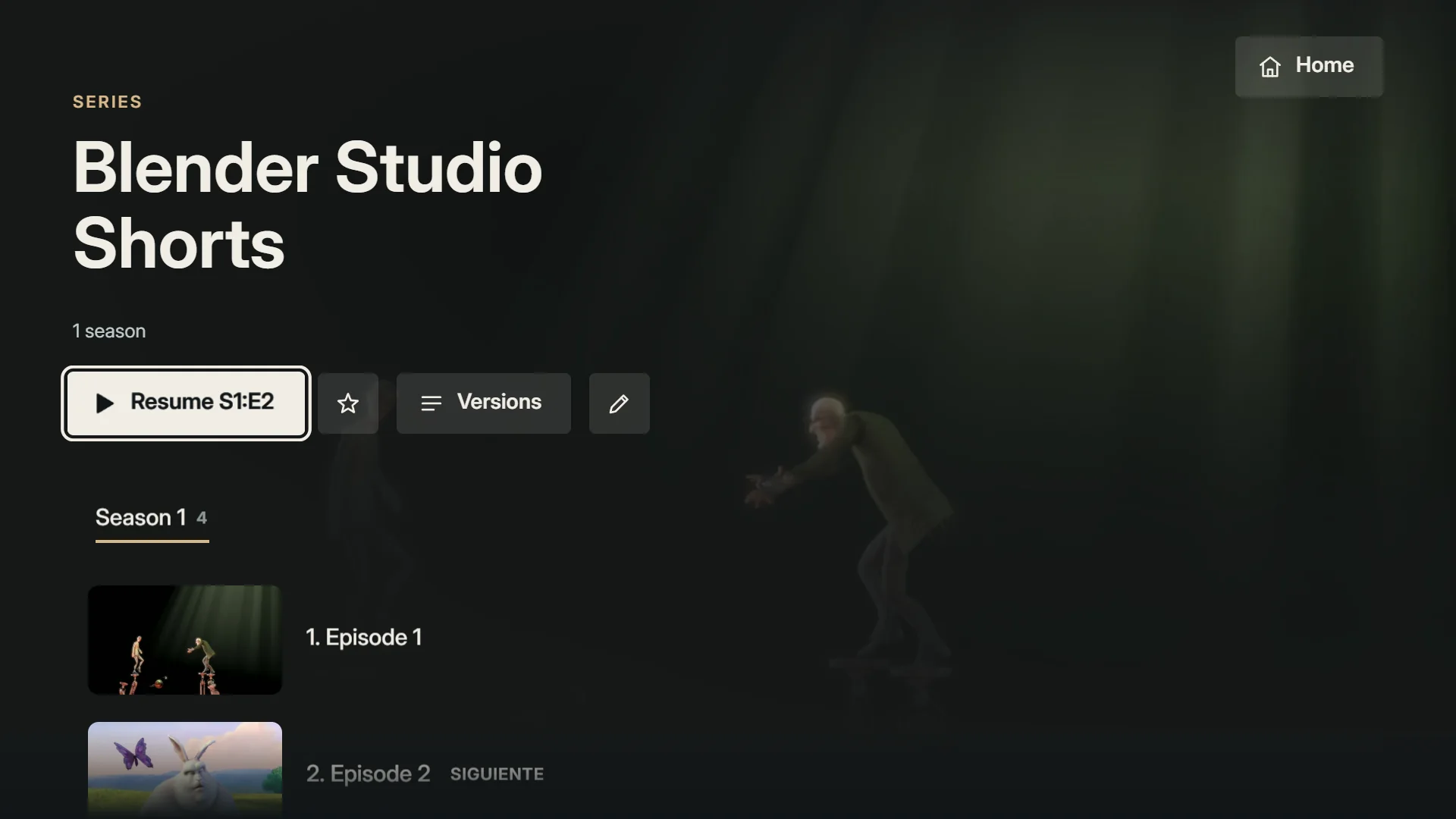
Bengala separates the films and series in your playlist, sorts episodes by season and remembers where you left off.
If the same film comes in several qualities, they’re grouped on a single page and you pick the version from there.
Series page on Android TV.
4From your phone
Your phone is the keyboard
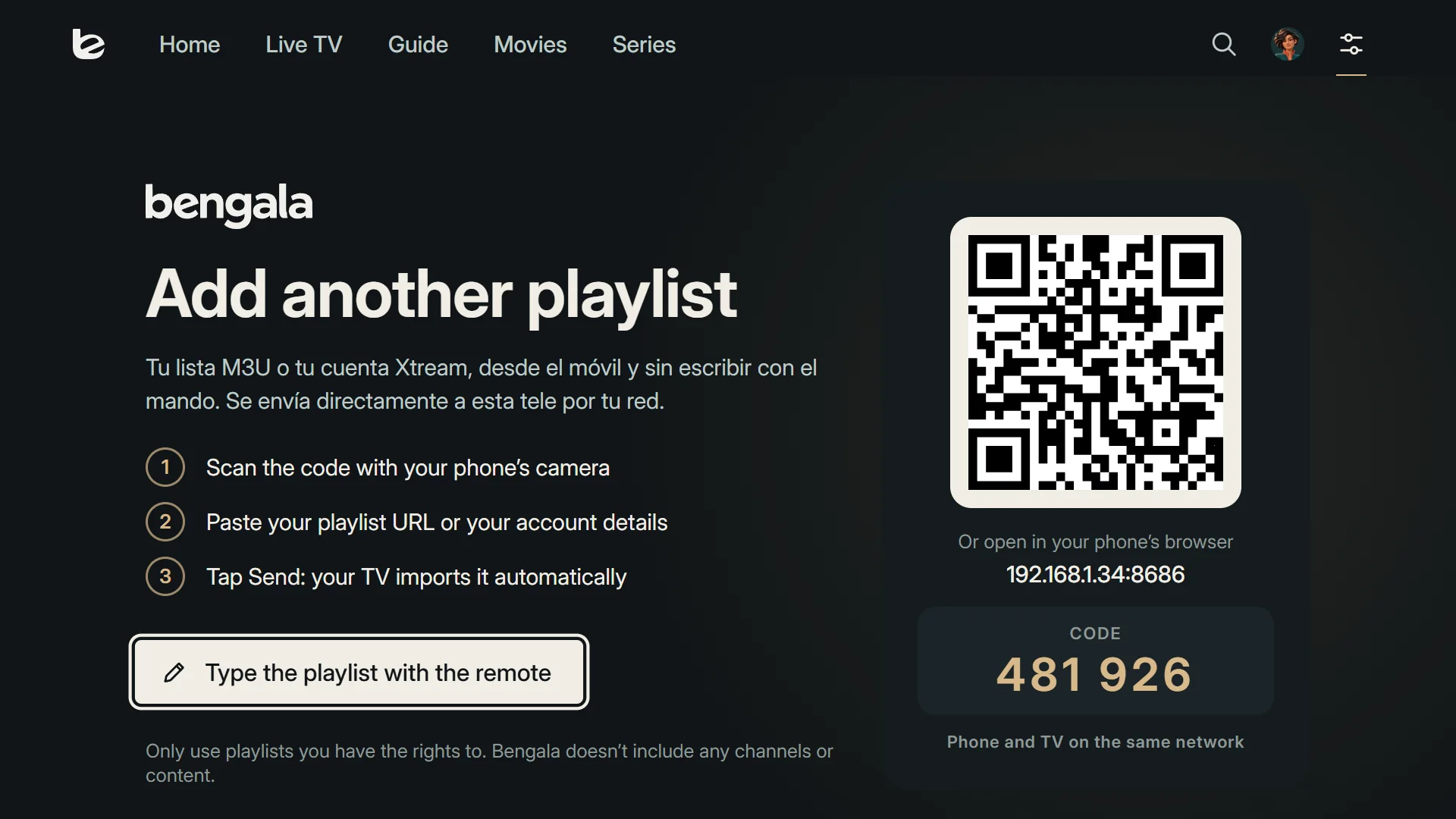
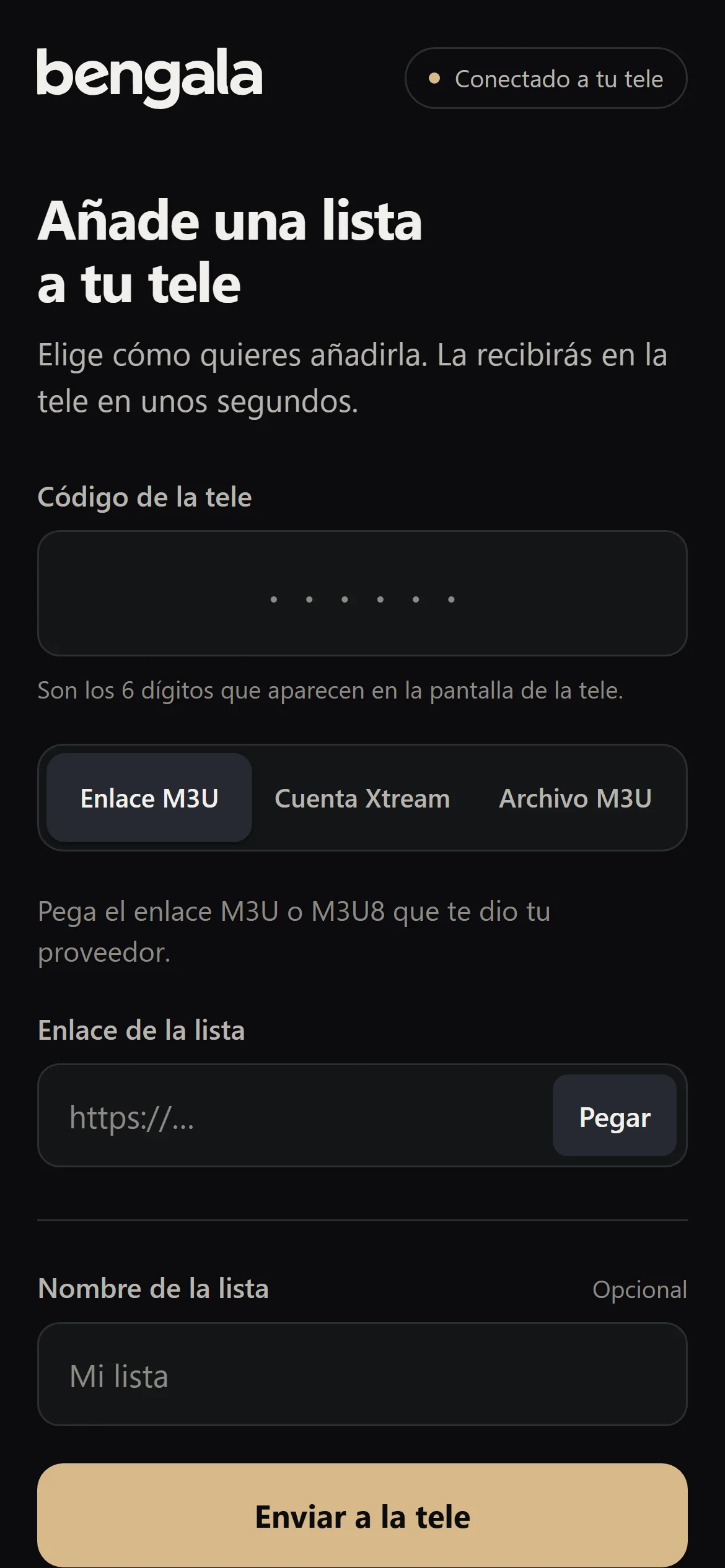
The TV shows you a code; scan it and a page opens on your phone where you can paste your playlist link or your Xtream details. The same goes for the guide, subtitles, a backup or a new PIN.
Your details go from your phone to your TV over your Wi-Fi, without passing through any server.
On the TV: the QR code and the six-digit code.
On your phone, with nothing to install.
Playlists
M3U and M3U8 by link or file, and Xtream Codes accounts
Guide
XMLTV, from your provider, a link or a file
Profiles
Each with its own favourites and ‘Continue Watching’; kids profiles
Parental controls
4-digit PIN, locked categories and adult content hidden
Audio and subtitles
Choose a track, adjust the delay and send your .srt or .vtt files from your phone
Sync
Playlists, profiles and progress on all your devices, end-to-end encrypted
Backup
Save it on your phone and restore it on any TV
App languages
Spanish, English, French, German, Italian and Portuguese
Download
Which TV have you got?
Bengala installs on your TV, or on the streaming device plugged into it, not on your phone. Choose yours.
1Android TV and Google TVAndroid 8.0 or later: TVs, Chromecast with Google TV and streaming boxesComing soon
2LG TVswebOS 5 or later, 2020 models onwardsComing soon
3Amazon Fire TVIt runs on Android, but we haven’t tested it yetUntested
4Samsung TVsThey run Tizen and there’s no version for them yet. With an Android TV box plugged in, it worksNot yet
Pricing
One or three devices, yearly or with a one-off payment
These are the prices Bengala will launch at. You can’t buy it yet: nothing is charged until launch.
1 device
Whichever TV or streaming device you like
Yearly
€9.99/year
€0.83 a month, billed once a year
One-off payment
€24.99paid once
Available at launch
3 devices
Up to 3 at once, on any platform
Yearly
€14.99/year
€1.24 a month, billed once a year
One-off payment
1 device only
Available at launch
Prices include VAT.
Your licence goes with your email, not your TVYou sign in with a code sent to your email. No passwords.
Switching devicesFree up the seat on the old one and sign in with your email on the new one. Each seat on your licence can move to a new device up to 2 times in 12 months; reinstalling on the same one doesn’t count.
Annual licence: cancel whenever you likeIt renews automatically every year, we remind you beforehand and you can cancel in two taps. It keeps working until the end of the year you’ve paid for.
One-off payment, no surprisesPay once and get updates for as long as Bengala is on sale.
Your playlists are none of our businessIf you sync between devices, they travel encrypted with a key that only your devices have.
Instant activationYour licence works as soon as you pay. So when you buy, you agree to it being activated straight away and give up the 14-day cooling-off period; your legal guarantee still applies in full.
Bengala doesn’t come with channels
It’s the player. Playlists, guides and subscriptions come from a provider entitled to offer them to you; we don’t sell any of them and we don’t know what’s in yours.
A TV with Android TV, Google TV or LG webOS 5 or later, and a playlist from your provider: an M3U link, an M3U file or the details of an Xtream account. To add it, all you need is a phone on the same Wi-Fi.
Does Bengala come with channels?
No. Bengala is just the player: it doesn’t include or sell channels, films or playlists. You need your own playlist from a provider entitled to offer it to you.
Will it work with my playlist?
Yes, if it’s M3U, M3U8 or Xtream Codes, which is what almost every provider gives you. Stalker and MAC portals don’t work with Bengala.
Does my playlist go through your servers?
No. When you add it from your phone, it goes straight to the TV over your Wi-Fi. If you turn on sync between devices, it travels encrypted with a key that only your devices hold, so we can’t read it.
How many devices can I use it on?
With the 1-device licence, one. With the 3-device licence, up to three at once, on any platform: an Android TV in the living room and an LG in the bedroom count just the same. Each seat can move to another device up to 2 times a year; reinstalling the app on the same one doesn’t count.
How do I buy it?
From your TV: Bengala shows you a QR code, you open it on your phone, sign in with your email and pay. The TV activates itself within a few seconds. Payment is processed by Stripe and we never see your card details.
Can I cancel the annual licence?
Yes, whenever you like and without giving a reason, from ‘Invoices and subscription’ on the page the QR code opens. It keeps working until the end of the year you’ve paid for and you won’t be charged again.
What if I get a new TV or mine breaks down?
Free up the seat on the old one in Settings → Account and sign in with your email on the new one. If the old one won’t switch on any more, email us and we’ll free up the seat for you.
Does it need an internet connection?
To watch your channels, yes, like anything streamed over the internet. The licence, on the other hand, is only checked every so often: Bengala keeps working for about 30 days even if it can’t reach our servers.
Does it work on my Samsung or on my phone?
Not on Samsung TVs yet: they run Tizen and there’s no version for them, but it does work with an Android TV box plugged into the TV. It doesn’t install on phones: your phone is there for typing whatever would be a faff with the remote.
Can I get a refund?
You have the legal guarantee: if Bengala doesn’t work as described, we’ll fix it, and if we can’t, we’ll refund what’s due. Beyond that, email us and we’ll look at it case by case. Before you buy, you get a 7-day free trial.